Meta’s Pocket app has officially launched across the United States, introducing a vertical social feed of fully interactive, playable creations called “gizmos” – and it requires absolutely no coding experience.
- What It Is: Meta’s new social app where users create interactive “gizmos” using natural language text prompts
- Core Technology: Powered by Muse Spark AI model from Meta Superintelligence Labs (MSL)
- How It Works: Type a description – AI generates playable, interactive software object within seconds
- Available On: iOS and Android devices in the United States
- Social Features: Likes, comments, reposts – but no private direct messaging
- Key Differentiator: Moves beyond static images and video to fully interactive feed content
- Previous Testing: Initial test phase in Brazil followed by quiet US preview
- Sharing: Export unique web links to share gizmos across any platform
Meta is accelerating its push into experimental social software with the public rollout of Pocket. Following an initial test phase in Brazil and a quiet US preview, the mobile application is now available across the United States. Rather than presenting a conventional feed algorithm of static images or short-form video clips, Pocket serves a vertical stream of fully interactive, playable creations dubbed “gizmos.” The app taps into the burgeoning trend of “vibe coding,” allowing anyone to generate, customize, play, and remix software-driven memes without writing a single line of traditional code.
Pocket represents a fundamental shift in how social content is created and consumed. Instead of scrolling past photos or videos, users interact directly with software objects that respond to touch, motion, and device sensors. The app positions interactive content as the next evolution of the social feed – moving from passive consumption to active participation.
For the first time, social media users can become creators of functional software simply by describing what they want to build. This democratization of software creation could reshape not just social media, but the broader creator economy. The timing coincides with growing interest in AI-powered content creation tools across the tech industry.
For authoritative context on Meta’s AI strategy, Meta’s official Pocket announcement provides direct insight into the company’s vision for interactive social content. Additionally, Meta’s research page on the Muse Spark model offers technical specifications and capabilities of the underlying AI engine.
Meta’s Pocket App: The Vibe Coding Social Revolution
Pocket arrives at a pivotal moment in social media evolution. Platforms have largely remained static – images, videos, and text posts dominate the landscape. Pocket challenges this convention by making every piece of content interactive. Users don’t just view; they tap, drag, swipe, draw, and shake their devices to engage with gizmos.
The app’s underlying philosophy is simple: software should be accessible to everyone, not just trained developers. By removing the barrier of traditional coding, Pocket opens creative possibilities to millions who might never consider themselves programmers. This aligns with Meta’s broader bet on AI as a creative partner rather than just a recommendation engine.
Meta has positioned Pocket as a testbed for whether interactive software itself can function as everyday social content. The company is watching closely to see if users embrace this new format or prefer more traditional forms of expression. Early indicators from the Brazilian test phase and US preview suggest strong engagement with interactive content. The Meta Pocket app launch marks a significant milestone in this experimental approach.
What Are ‘Gizmos’ and How Do They Work?
Gizmos are the core content unit of Pocket – fully interactive, software-driven creations that respond to user input. They can range from simple animated memes to complex mini-games, interactive art pieces, or playful utilities. Each gizmo is generated on-demand using natural language descriptions provided by the creator.
Once created, gizmos live in Pocket’s vertical feed where other users can interact with them directly. The interactive nature means every viewing experience can be unique – users might explore different paths in a mini-game, trigger different animations, or discover hidden features embedded by the creator.
Examples of potential gizmos include: a virtual pet that responds to screen taps, a mobile maze game controlled by tilting the phone, an interactive story where choices change the outcome, a drawing tool that transforms sketches into animations, or a digital instrument that creates music through touch gestures.
How Vibe Coding Works Inside Pocket
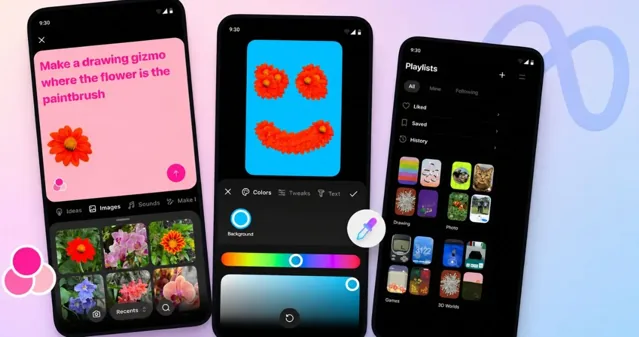
Creating on Pocket requires only natural language text descriptions. Users simply type what they want to build – such as “an old desktop computer where clicking the monitor reveals a secret image” or “a mini-game that bounces a character when tilting the phone.” Within seconds, the platform’s underlying generative AI engines assemble a functioning, interactive software object.
The process is intentionally frictionless. There are no templates to navigate, no menus to configure, and no complex settings to adjust. Just type, generate, and experience your creation instantly. This simplicity is central to Pocket’s appeal – it makes creation feel more like play than work.
Creators can subsequently refine their gizmos by modifying prompts, tweaking visuals, incorporating background music, or integrating camera roll photos. This iterative process allows for rapid experimentation and improvement, with each modification generating a new version of the gizmo in seconds. As a vibe coding app, Pocket makes this iterative creative process accessible to everyone.
The Muse Spark AI Model Explained
Under the hood, Pocket is powered by the Muse Spark model developed within Meta Superintelligence Labs (MSL). Muse Spark represents a significant advancement in generative AI for interactive content. Unlike text-to-image or text-to-video models, Muse Spark is specifically trained to generate functional software objects with interactive logic, physics, and user responsiveness.
The model’s architecture combines natural language understanding with code generation and visual design capabilities. When a user submits a text prompt, Muse Spark interprets the intent, generates the necessary code structure, designs appropriate visual assets, and assembles a complete, functional gizmo.
Key technical capabilities of Muse Spark include: real-time rendering of interactive objects, physics simulation for games and animations, sensor integration (gyroscope, accelerometer, touch pressure), responsive design for various screen sizes, and seamless audio integration. The model continues to improve through user interactions, learning what types of gizmos resonate with audiences.
Hands-On: Creating Your First Gizmo
Getting started with Pocket requires just a few simple steps. First, download the app from the iOS App Store or Google Play Store. Create an account or sign in with your existing Meta credentials. Then tap the “Create” button and start typing your idea.
For first-time creators, starting simple works best. Try prompts like: “A bouncing ball that changes color each time it hits the bottom” or “A button that plays a funny sound when pressed.” These basic gizmos help you understand how the AI interprets your instructions before moving to more complex creations.
The app also encourages remixing. When you find a gizmo you enjoy, you can tap the remix button to create your own version – keeping what you like and changing elements you want to improve. This remix culture mirrors the collaborative spirit of open-source software development but makes it accessible to everyone.
Interactive Mechanics and Sensor Integration
Pocket gizmos are fully responsive, letting users tap, drag, swipe, draw, and utilize device sensors like gyroscopes to interact directly on their mobile screens. This sensor integration creates experiences that feel more immersive and physical than traditional social content.
Examples of sensor-driven interactions include: games where tilting the phone controls a character, drawing tools that respond to the speed and pressure of finger movements, animations that react to shaking the device, and augmented reality-style experiences that use the camera feed as a background.
The creative possibilities expand significantly when combining multiple interaction types. A single gizmo might respond to taps, tilts, and camera input simultaneously – creating rich, multi-layered experiences that rival dedicated mobile games. Yet all of this complexity is generated from a simple text description.
The Feed: Moving Beyond Static and Video Content
Pocket’s vertical feed operates on familiar social mechanics – including likes, comments, and reposts – while intentionally omitting private direct messaging to keep the emphasis entirely on public creation and remixing. This design choice encourages a more collaborative and open community dynamic.
Every gizmo in the feed is fully interactive. Users can play games, explore creations, and engage with content in ways impossible on traditional platforms. This interactivity creates deeper engagement and longer session times – each gizmo offers a mini-experience rather than just a quick glance.
The algorithm powering the feed surfaces engaging gizmos based on interaction patterns. Unlike traditional platforms that optimize for time-wasting content, Pocket’s algorithm rewards creativity and interaction quality. Gizmos that generate more playful engagement and remixes receive greater visibility.
Social Features and Community Dynamics
Likes, comments, and reposts form the backbone of Pocket’s social layer. Users can show appreciation for creative gizmos, provide feedback to creators, and share their favorite creations with their followers. The comment sections have become spaces for collaborative improvement, with creators often incorporating user suggestions into updated versions.
Users can export unique web links to share individual gizmos across third-party chat platforms and social networks. This sharing capability creates viral potential – a compelling gizmo can spread beyond Pocket’s walls, attracting new users to the platform and building excitement around the creation community.
The absence of private messaging has been noted as an intentional choice. Meta wants Pocket to feel more like a public creative arena than a private social network. All communication is transparent, encouraging positive public feedback and discouraging harassment or negative behavior that often thrives in private channels.
Comparison: Pocket vs. TikTok, Instagram Reels, Snapchat
Pocket enters a crowded social media landscape dominated by video-first platforms. However, its interactive, AI-generated approach distinguishes it from competitors in several key ways. Unlike TikTok and Instagram Reels, Pocket content isn’t just watched – it’s experienced and interacted with.
| Feature | TikTok | Instagram Reels | Snapchat Lenses | |
|---|---|---|---|---|
| Content Format | Interactive gizmos | Short video | Short video | AR filters |
| Creation Method | Text prompts + AI | Video recording/editing | Video recording/editing | AR tools/Lens Studio |
| Coding Required? | No | No | No | Yes (advanced features) |
| User Interactivity | Full touch/sensor response | Play/pause only | Play/pause only | Camera-based interaction |
| Monetization | None announced | Creator Fund, ads | Bonuses, ads | Creative Fund |
Why Meta Chose This Direction
Meta’s decision to launch Pocket reflects several strategic priorities. First, the company is seeking to diversify beyond its flagship platforms and capture emerging user behaviors. Second, the “vibe coding” trend has demonstrated significant cultural momentum, with creators embracing AI-assisted creation tools. Third, interactive content represents a potential new category that could attract younger audiences seeking more engaging digital experiences.
Pocket also serves as a testbed for Meta’s AI capabilities. The Muse Spark model represents significant research investment, and Pocket provides real-world usage data to refine and improve the technology. The feedback loop between user interactions and model training could accelerate improvements across Meta’s broader AI ecosystem.
Additionally, Pocket helps Meta stay competitive with other tech companies exploring AI-powered creation tools. While competitors focus on text-to-image or text-to-video generation, Pocket’s interactive approach carves out a unique niche that could prove difficult to replicate without comparable AI capabilities.
Availability, Rollout Timeline, and Future Plans
Pocket is available as a free download for iOS and Android devices in the United States. The US launch follows an initial test phase in Brazil and a quiet US preview period. Meta has not yet announced specific timelines for international expansion, but industry observers expect global rollout in phases throughout the coming months. The Meta Pocket launch strategy reflects the company’s methodical approach to rolling out new platforms.
The app’s rollout aligns with Meta’s broader strategy of rapidly releasing standalone experimental tools – joining recent releases such as the native Meta AI desktop client for Mac – to evaluate user engagement across emerging AI interaction paradigms. This strategy allows Meta to iterate quickly based on user feedback without disrupting its core platforms.
Future development plans remain under wraps, but the company is likely watching several metrics closely: user retention and engagement rates, creation frequency and quality, viral spread of popular gizmos, and monetization potential. Depending on early performance, Meta may accelerate expansion or pivot features based on user behavior.
Privacy, Data, and Moderation Considerations
As with any Meta product, privacy and data handling are important considerations. Pocket’s privacy policy explains that user data – including text prompts, created content, and interaction patterns – is collected to improve the Muse Spark model and personalize the user experience. Users should be aware that their creative prompts may be analyzed to refine AI capabilities.
Content moderation on Pocket follows Meta’s established community guidelines. However, interactive content presents new moderation challenges – a seemingly innocent gizmo might contain hidden inappropriate content or behavior. Meta has developed automated detection tools specifically for interactive content, but the learning curve for these systems suggests some moderation challenges may persist.
Users concerned about data privacy can use Pocket without linking to other Meta accounts, though this limits some social features. The app’s minimal data collection requirements for basic functionality make it relatively accessible for privacy-conscious users compared to Meta’s other platforms.
What This Means for Creators and the Meme Economy
Pocket’s arrival could significantly impact the creator economy and meme culture. Traditional meme creation requires image editing skills or meme generator tools. Pocket introduces a new category – interactive memes that incorporate gameplay, animation, and user participation. This expands the definition of what a meme can be and who can create one.
For creators, Pocket offers a new platform to build audiences without existing followers. The quality of creations matters more than creator reputation – anyone can go viral with a compelling gizmo. This could lower barriers to entry and diversify the creator landscape beyond established influencers.
However, creators may have questions about monetization. Meta has not introduced advertising into Pocket or connected it directly to Instagram, leaving the earning potential unclear. The company may eventually introduce creator monetization features similar to Instagram’s bonuses or TikTok’s Creator Fund, but no such plans have been announced.
The Vibe Coding Trend Explained
“Vibe coding” refers to creating software using AI assistance, where the creator describes what they want in natural language rather than writing code line by line. The term has gained traction as AI coding assistants have become more sophisticated, allowing non-programmers to build functional software through conversation with AI models.
Pocket takes vibe coding mainstream by applying it to social content creation. Instead of building complex applications, users create shareable, interactive objects that fit within a social feed format. This lowers the stakes of creation while maintaining the excitement of bringing ideas to life through AI.
The growth of vibe coding represents a significant cultural shift in who can be a “creator.” No longer limited to those with years of coding experience, creative expression can now take digital form through AI assistance. Pocket’s success could accelerate this trend and inspire similar features across other platforms.
Technical Specifications and Underlying Technology
Pocket is built on a modern tech stack optimized for mobile performance and rapid AI inference. The Muse Spark model runs on Meta’s custom AI infrastructure, leveraging specialized hardware for real-time generation. This architecture enables the sub-second response times crucial for a seamless creative experience.
The app supports all modern mobile devices with gyroscope and accelerometer capabilities. Performance optimization ensures gizmos run smoothly across various device specifications, though more complex creations may perform better on newer hardware. Meta recommends devices with at least 4GB of RAM for optimal experience.
Gizmos are exported as portable interactive objects that can be embedded through web links. The sharing technology works across major platforms – Instagram, Facebook, Twitter, WhatsApp, Telegram, and messaging apps. This cross-platform compatibility enhances Pocket’s viral potential by removing friction from sharing.
Frequently Asked Questions About Meta’s Pocket App
[faq]What is Meta’s Pocket app?
Pocket is Meta’s new social mobile app that allows users to create and share interactive “gizmos” – playable, responsive content generated through natural language text prompts using AI, without any coding required.
How do I download the Pocket app?
Pocket is available as a free download from the iOS App Store for iPhone users and the Google Play Store for Android users in the United States.
Is Pocket available outside the US?
Currently, Pocket is only available in the United States following a test phase in Brazil. Meta has not announced specific timelines for international expansion, though global rollout is expected in phases.
What is vibe coding and how does it work?
Vibe coding is creating software using AI assistance – describing what you want in natural language instead of writing code. In Pocket, you type what you want to build, and the AI generates a fully interactive gizmo within seconds.
What are gizmos in the Pocket app?
Gizmos are fully interactive, software-driven creations in Pocket. They can be mini-games, animated memes, interactive art, or playful utilities that respond to touch, motion, and device sensors – all generated from simple text descriptions.
Is Pocket free to use?
Yes, Pocket is completely free to download and use. Meta has not introduced any paid features or subscriptions at this time.
What is the Muse Spark AI model?
Muse Spark is the generative AI model developed within Meta Superintelligence Labs that powers Pocket. It’s specifically trained to generate functional, interactive software objects from natural language descriptions.
Can I make money on Pocket?
Meta has not introduced monetization features for Pocket yet. There is currently no creator fund, advertising, or direct revenue-sharing mechanism in place for Pocket creators.
How is Pocket different from TikTok?
Unlike TikTok’s video-first approach, Pocket features interactive, playable content that users can tap, drag, and interact with. Rather than watching passively, users engage directly with software-driven creations. Additionally, no coding is required to create content on Pocket.
Does Pocket collect my data and is it private?
As a Meta product, Pocket collects user data including text prompts, created content, and interaction patterns to improve the Muse Spark model. The app follows Meta’s privacy policy, and users can use Pocket without linking to other Meta accounts for reduced data sharing.
The Future of Social Content Is Interactive
Pocket represents a bold bet on the future of social media. If successful, it could inspire competitors to develop similar interactive features, fundamentally changing how we experience social feeds. The app’s “vibe coding” approach democratizes software creation, potentially unlocking a new wave of creative expression from people who never considered themselves developers.
However, challenges remain. The quality and consistency of AI-generated gizmos will need to improve as usage scales. Moderation of interactive content requires new detection approaches. User adoption beyond early adopters and tech enthusiasts remains uncertain. And Meta will need to demonstrate the long-term value proposition for both creators and consumers.
For now, Pocket offers an exciting glimpse into a more interactive, playful social media landscape. As creators experiment with the platform and push the boundaries of what’s possible with vibe coding, we’ll discover whether interactive gizmos represent the next evolution of social content or just another experiment in Meta’s ever-expanding portfolio.
One thing is certain – social media is no longer just something you watch. With Pocket, it’s something you play, create, and share. And that changes everything.