
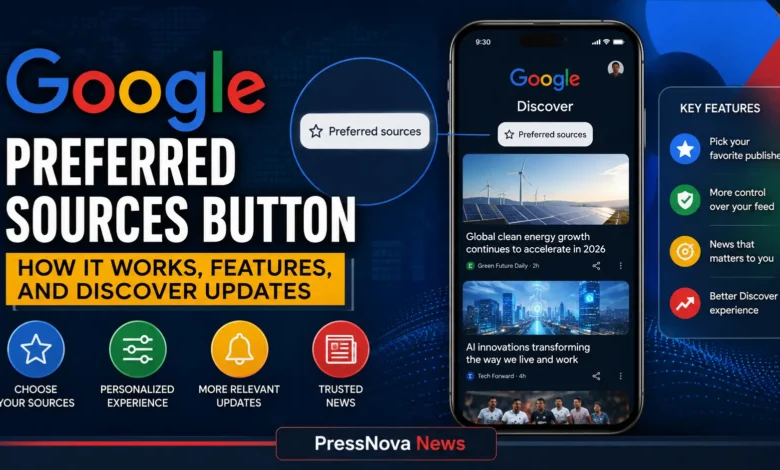
Google Preferred Sources button allows publishers to recover referral traffic by letting readers favorite their outlets directly from their websites, with those sources then prioritized across Google Search, Discover, and Google News streams. The embeddable tool arrives as publishers face mounting challenges from AI Overviews and zero-click searches, offering a direct mechanism to convert loyal readership into sustained search visibility.
- Publisher Empowerment: The Preferred Sources button lets readers add your site as a preferred source directly from your web pages, without leaving your site
- Traffic Impact: Users are twice as likely to click through to a source explicitly designated as preferred, helping publishers capture higher-intent traffic
- Discover Natural Language: Users can now customize their Discover feed using plain-language prompts, telling Google exactly what they want to see or skip
- Global Rollout: The feature has expanded globally in all supported languages, with integration into AI Overviews and AI Mode
- Implementation Options: WordPress publishers can add the button using dedicated blocks, shortcodes, or custom HTML with no complex coding required
- User Control: Readers can manage all preferred sources at any time through their Google account settings
Editor’s Note on Features: This article provides an analysis of Google’s Preferred Sources button and Discover natural language updates. Features may roll out gradually across regions and platforms. PressNova News will update this article as additional capabilities and implementation guidance becomes available.
The Preferred Sources button emerges as Google’s response to significant traffic headwinds facing digital publishers. With zero-click searches now representing a majority of standard web queries and AI Overviews accelerating this trend, the button provides web publishers with a practical tool to defend their direct audience relationships. When a visitor clicks the button on a participating website, that outlet is added to the user’s account-level source preferences, and Google’s ranking systems place heavier prominence on links from that publisher in relevant searches.
According to Google’s internal data, users are twice as likely to click through to a source when it is explicitly designated as a preferred outlet. The feature, which initially rolled out in the US and India, expanded globally in all supported languages in April 2026. In May 2026, Google extended Preferred Sources into AI Overviews and AI Mode, where links from preferred sources are labeled with a badge so users can easily spot them. Google’s official Search Central documentation provides the authoritative implementation guidelines for publishers.
Alongside the publisher button, Google has introduced significant upgrades to Discover personalization. Users can now customize their Discover feed using natural language prompts accessible through any three-dot menu on a Discover post. This feature allows readers to type plain-language instructions such as “Show me long-form content and deep dives about smart home tech, but skip product news and press releases.” The system remembers these preferences for future visits and provides a confirmation dialog before applying changes.
Google representatives have emphasized the importance of giving users more control over their content experience. “We’re committed to helping users find the information that matters most to them,” a Google spokesperson told Search Engine Land. “The Preferred Sources button and Discover natural language updates are designed to put more power in the hands of both readers and the publishers they trust.” This sentiment aligns with Google’s broader strategy of balancing AI-driven content delivery with user agency.
How the Google Preferred Sources Button Works
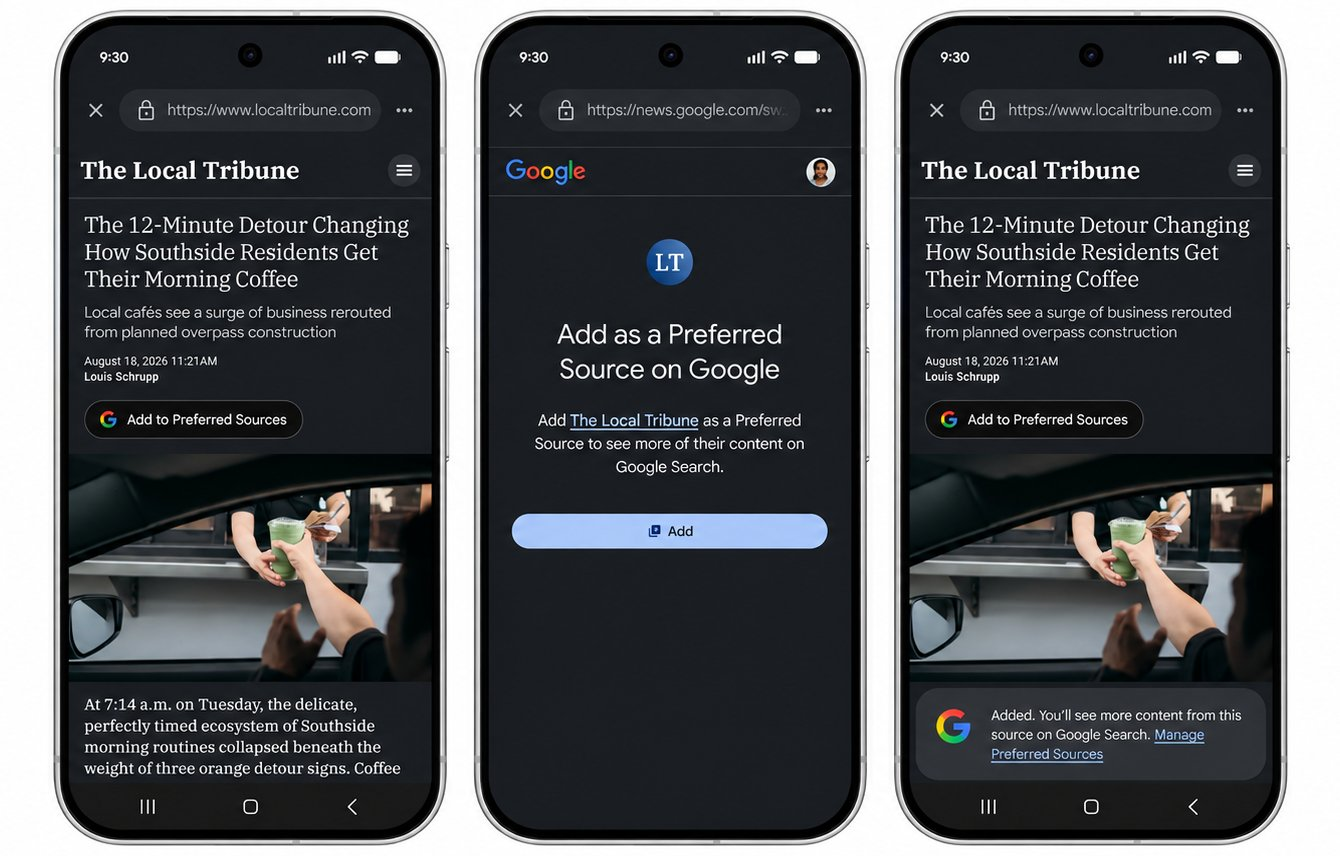
The Preferred Sources button functions as a direct bridge between a publisher’s website and a reader’s Google profile. Unlike previous personalization options that required users to navigate through settings menus, the embeddable tool lets readers add a site as a preferred source with a single click, without ever leaving the publisher’s page.
When a user clicks the Preferred Sources button, they are taken to Google’s source preferences page where the publisher’s URL is pre-filled. After confirming their selection, the source is added to the user’s account-level preferences. The button uses Google’s official deeplink format at google.com/preferences/source with the publisher’s domain as a query parameter.
Once added, Google’s ranking systems place heavier prominence on links and articles from that chosen publisher when the user searches for relevant topics or interacts with conversational AI queries. In practice, this means the source appears more frequently in the Top Stories carousel and in a dedicated “From your sources” section below Top Stories. In AI Overviews and AI Mode, links from preferred sources display a badge, making them more visible to users.
Users can manage their preferred sources at any time by visiting google.com/preferences in their account settings. This central hub allows readers to view, add, or remove sources, giving them full control over which publishers they want to prioritize across Google’s surfaces.
Step-by-Step Implementation for Publishers
Google’s official Search Central documentation provides comprehensive implementation guidelines, including the deeplink format and downloadable button assets. Publishers can add the button alongside existing calls to action like social follow prompts and newsletter signups.
Strategic Placement Recommendations
For maximum visibility and click-through rates, publishers should place the Preferred Sources button in prominent, high-traffic locations on their website. Recommended positions include:
- Above the fold: Placing the button in the header or navigation area ensures readers see it immediately upon arrival
- After article content: Positioning the button at the end of articles captures readers who have just consumed content and are more likely to want more from that publisher
- Sidebar widgets: Including the button in persistent sidebar elements increases exposure across multiple pages
- Mobile sticky elements: A floating button on mobile devices can improve visibility without requiring user scrolling
- Email newsletters: Including a prominent “Add us as a Preferred Source” call-to-action in newsletters can drive engaged readers to take action
- Popup or slide-in prompts: For readers who have spent significant time on the site, timed prompts can be effective without being intrusive
Publishers should consider A/B testing different placements to determine which locations generate the highest click-through rates for their specific audience.
Manual HTML Implementation
For publishers comfortable with basic HTML, the preferred-source button can be added using this deeplink format:
<a href="https://www.google.com/preferences/source?domain=yourdomain.com" target="_blank">Add to Preferred Sources</a>To incorporate the official Google icon and styling, you can use the complete HTML implementation:
<a href="https://www.google.com/preferences/source?domain=yourdomain.com" class="google-preferred-source-btn" target="_blank" rel="noopener noreferrer">

  <img src="https://www.google.com/images/preferred-source-icon.svg" width="20" height="20" alt="" />

  Add to Preferred Sources

</a>
Publishers should replace yourdomain.com with their actual domain and use their own styling if desired.
WordPress Implementation (Recommended)
For WordPress publishers, SEOPress 10 introduces two straightforward ways to place a preferred-source button on your site:
- The Google Preferred Sources block for the WordPress block editor (Gutenberg)
- The
[seopress_preferred_source]shortcode for widgets, classic content, and page builders
To add the block:
- Open the post, page, or template where you want the button
- Click the + (Add block) button
- Search for “Google Preferred Sources”
- Select the block to drop it into place
- Adjust settings in the block sidebar (label, logo, domain)
- Update or Publish
The button is free, lightweight, and requires no heavy external scripts that might slow page loading.
Publishers can also add the shortcode to theme files or widget areas:
[seopress_preferred_source domain="yourdomain.com" label="Add to Preferred Sources" logo="true"]Other CMS Platforms
For publishers using Shopify, Wix, Squarespace, or custom CMS platforms, the manual HTML implementation works universally. Simply add the deeplink HTML to any location where you want the button to appear. Shopify merchants can add the code to their theme’s liquid templates, while Wix users can use the HTML embed element.
No minimum traffic requirements or publisher eligibility restrictions have been announced. Any website publisher can implement the button and benefit from the feature.
Integration with Google News Publisher Center
The Preferred Sources button works alongside existing Google News publisher tools but serves a distinct purpose. While Publisher Center allows publishers to manage their content presence in Google News, the Preferred Sources button directly influences user-level personalization. Publishers should use both tools in concert: Publisher Center for content management and Preferred Sources for audience engagement. This integrated approach ensures publishers maximize their visibility across Google’s various surfaces.
Google Discover Natural Language Control
Alongside the publisher button, Google is giving readers more granular, conversational control over the content displayed on their personal feeds. In the Google mobile app, users can customize their Discover stream using natural language prompts.
How Natural Language Prompts Customize Your Feed
By opening the three-dot menu on any Discover post, readers can type plain-language instructions allowing the feed algorithms to refine topic weightings in real time. The system interprets these natural language cues and adjusts content recommendations accordingly.
This represents a significant shift from previous customization options, which required users to navigate through multiple settings menus or manually select topics from a predefined list. The natural language approach lowers the barrier to personalization, making it more accessible to casual users.
Behind the scenes, Google’s machine learning models analyze the semantic meaning of user prompts using natural language understanding (NLU) techniques. These models process the text input through transformer-based architectures that map user preferences to topic embeddings, enabling nuanced content recommendations. The system continuously refines its understanding as users provide additional prompts or interact with recommended content, creating a personalized feedback loop.
Examples of Natural Language Customization
Users can provide a wide range of natural language instructions to refine their Discover feed:
- Topic Preferences: “Show me more articles about artificial intelligence and machine learning”
- Content Depth: “I want to see long-form investigative journalism, not quick summaries”
- Source Preferences: “Show me more content from tech publications and less from entertainment sites”
- Content Exclusion: “Don’t show me celebrity gossip or sports updates”
- Tone and Style: “I prefer in-depth tutorials and how-to guides over opinion pieces”
- Format Preferences: “Show me more video content and infographics”
The system remembers these preferences for future visits and provides a confirmation dialog before applying changes. Users can refine or override their preferences at any time, creating a more personalized and relevant Discover experience.
Preferred Sources vs. Other Google Personalization Features
Google offers several personalization tools that work alongside the Preferred Sources button, each serving a distinct purpose:
| Feature | Functionality | User Control | Publisher Benefit |
|---|---|---|---|
| Preferred Sources | Prioritizes selected publishers in Search, Discover, and News | Users add sources via publisher’s button or settings | Increases visibility and click-through rates for favorites |
| Follow Button | Adds publishers to a follower list in Discover | Users follow publishers via dedicated follow button | Builds direct audience connection, less algorithmic weight |
| Publisher Center | Management tool for publishers to control content in Google News | Publisher-side management, not user-facing | Allows publishers to manage content and branding |
| AI Overviews Badge | Labels preferred sources in AI-generated responses | Automatic for preferred sources | Increases trust and visibility in AI-generated summaries |
| Discover Feed Preferences | Topic-level adjustments and content interests | Users select topics from a predefined list | Indirect benefit through topic association |
The Preferred Sources button distinguishes itself by giving publishers a proactive role in capturing reader loyalty. Unlike passive personalization tools that rely on user settings discovery, the button empowers publishers to actively solicit this preference at the moment of reader engagement.
Why the Preferred Sources Button Matters for Publishers
The Preferred Sources button arrives amid broader structural shifts in search economics. Zero-click queries now represent a majority of standard web searches, prompting major content aggregators and media companies to reconsider licensing arrangements and web-crawler access. While the new button cannot reverse the broader trend toward AI summarization, it provides web publishers with a practical tool to defend their direct audience relationships and maximize click-through visibility across Google’s discovery surfaces.
Fighting Zero-Click Search Trends
With AI Overviews appearing for an increasing percentage of search queries, publishers have seen referral traffic decline significantly. The Preferred Sources button offers a countermeasure by ensuring that users who actively choose a publisher see more of their content in search results. This is particularly valuable for publishers with strong brand loyalty and engaged audiences.
The feature also creates a virtuous cycle: users who click the button see more content from that publisher, reinforcing brand recognition and trust. Over time, this can lead to increased direct traffic, higher engagement metrics, and improved overall SEO performance.
For publishers, the strategic value extends beyond immediate traffic gains. The button serves as a signal to Google’s algorithms that a publisher has an engaged audience willing to explicitly choose them, potentially contributing to broader authority signals. While not a direct ranking factor, the engagement and click-through data generated by preferred sources may influence how Google’s systems evaluate content quality and relevance.
Limitations and Considerations
While the Preferred Sources button offers significant potential, publishers should be aware of certain limitations:
- User Adoption Required: The button only works when readers actively click it. Publishers must actively promote the feature to their audience through various touchpoints.
- Not a Ranking Signal: The button does not directly influence Google’s core search ranking algorithms. It affects personalization for users who have explicitly chosen a source.
- Gradual Impact: The effects on traffic may accumulate over time as more users add a publisher as a preferred source. Immediate traffic spikes are unlikely.
- Competition: As more publishers adopt the button, the relative advantage may diminish, though early adopters may benefit from establishing reader loyalty first.
- Platform Dependency: The feature is tied to Google’s ecosystem; publishers should not rely solely on this tool and should maintain diversified traffic acquisition strategies.
Publishers should integrate the Preferred Sources button as part of a comprehensive traffic strategy that includes email newsletters, social media engagement, and content excellence. The button is most effective when combined with high-quality content that encourages readers to want more of what you produce.
Publisher Success Metrics
While comprehensive case studies are still emerging as the feature continues to roll out, early anecdotal evidence suggests meaningful traffic improvements for publishers with engaged audiences. Publishers who actively promote the button through email campaigns and on-page placements have reported increased referral visibility from users who have added them as preferred sources. The most successful implementations combine strategic button placement with consistent audience communication about the value of using the feature.
Frequently Asked Questions
[faq]What is Google’s Preferred Sources button?
Google’s Preferred Sources button is an embeddable tool that lets readers add a publisher to their Google account preferences with a single click. Once added, that publisher’s content appears more prominently in the user’s Google Search results, Discover feed, and Google News streams.
How do I add the Preferred Sources button to my website?
You can add the Preferred Sources button using Google’s official deeplink format: google.com/preferences/source?domain=yourdomain.com. For WordPress sites, SEOPress 10 offers a dedicated Gutenberg block and shortcode. Manual HTML implementation also works for any CMS platform. Google’s Search Central documentation provides the complete implementation guidelines.
Does the Preferred Sources button work with all CMS platforms?
Yes, the Preferred Sources button can be added to any website using basic HTML. WordPress users have additional convenience through dedicated plugins and blocks, but the manual implementation works universally on Shopify, Wix, Squarespace, and custom CMS platforms.
How does the Preferred Sources button affect Google Search ranking?
The Preferred Sources button does not directly affect Google Search rankings as a ranking signal. However, when a user marks a source as preferred, that publisher’s content appears more prominently for that specific user in search results, Top Stories, Discover, and AI Overviews. This can lead to higher click-through rates and engagement, which may indirectly benefit overall visibility.
What is Google Discover natural language customization?
Google Discover natural language customization allows users to refine their content feed using plain-language instructions. By tapping the three-dot menu on any Discover post, users can type prompts such as “Show me more technology news” or “Skip sports updates,” and the system adjusts recommendations accordingly using machine learning models that interpret natural language cues.
Is the Preferred Sources button available globally?
Yes, the Preferred Sources button has rolled out globally in all supported languages. Initially available in the US and India, the feature expanded worldwide in April 2026 and has since been integrated into AI Overviews and AI Mode.
Article Update Notice: This article provides analysis of Google’s Preferred Sources button and Discover natural language features as of August 2026. PressNova News will update this article as Google releases additional functionality, implementation guidance, or performance data for publishers.