Imagine this: It’s a crisp Saturday evening, the rain is tapping softly against the windowpane, and you’ve finally settled down to watch that highly anticipated movie. The popcorn is perfect, the lighting is just right, and your stunning Samsung TV displays a picture so vivid it almost pulls you into the scene. But then, something feels… off. The dialogue sounds muffled, the explosions lack their punch, and that beautiful orchestral score just doesn’t resonate the way it should. (Doesn’t that just ruin the whole vibe?) You’re left wondering if you bought the wrong TV, or perhaps if your ears are playing tricks on you. Many of us have been there, gazing at a brilliant 4K display only to be let down by an audio experience that feels flat, almost like listening to the world through a thin wall. This frustration is surprisingly common, even with top-tier televisions. We invest so much in visual fidelity, sometimes forgetting that half the immersive experience comes from what we hear. A good picture without good sound is like a gourmet meal without seasoning – it just doesn’t hit the same. The truth is, your Samsung TV’s sound quality has immense untapped potential, and with a few smart adjustments, you can transform your living room into a truly captivating audio-visual haven. You might be surprised at the difference a few tweaks can make to your overall home theater pleasure.
I remember vividly a Sunday afternoon, trying to re-watch a classic action film. The visuals were breathtaking, truly, but the gunshots sounded like weak firecrackers and the stirring soundtrack felt distant. My wife, usually patient with my tech tinkering, just gave me a look that said, “Are you ever going to fix that?” It was a wake-up call. I knew my TV was capable of more, and I was determined to unlock its full acoustic potential. After a deep dive into settings, external devices, and even room dynamics, I was genuinely shocked by the improvement. The difference wasn’t just noticeable; it was night and day. Suddenly, every whisper, every explosion, every musical note was rendered with clarity and depth I hadn’t thought possible from my existing setup. You see, getting the best sound quality out of your Samsung TV isn’t about magical, expensive upgrades; it’s often about understanding and optimizing what you already have, or making one or two strategic additions that truly amplify the experience. It’s about leveraging features that are already built-in, and understanding how your environment impacts what you hear. Let’s embark on this journey together and discover how to elevate your audio from merely adequate to absolutely spectacular.
It’s fascinating how many hidden gems are tucked away in our televisions’ menus, just waiting to be discovered. Sometimes, the simplest adjustments can yield the most profound results, turning a mediocre listening experience into something quite extraordinary. You don’t need to be an audiophile with thousands of dollars to spend on high-end equipment, though that certainly helps! For most of us, the goal is to get the most out of our current gear, especially our beloved Samsung televisions. Think of it as fine-tuning a musical instrument; a slight turn of a knob here, a minor adjustment there, and suddenly the melody sings with newfound clarity and richness. The rain has stopped now, the sun is peeking through the clouds, and I can almost hear the birds outside chirping in anticipation of better sound. Ready to transform your viewing experience? Let’s dive into some practical, easy-to-implement tips that will make your Samsung TV audio shine.
Unlocking Your Samsung TV’s True Audio Potential

Getting the best out of your television’s audio capabilities often starts right where you’d least expect it: within the TV’s own settings menu. It’s a goldmine of options that many users overlook, simply accepting the default audio profile. But trust me, a few minutes spent navigating these menus can lead to a significant upgrade in your overall enjoyment. You might even find yourself saying, “Wow, it always sounded like this?”
1. Dive Deep into Your Samsung TV’s Sound Settings
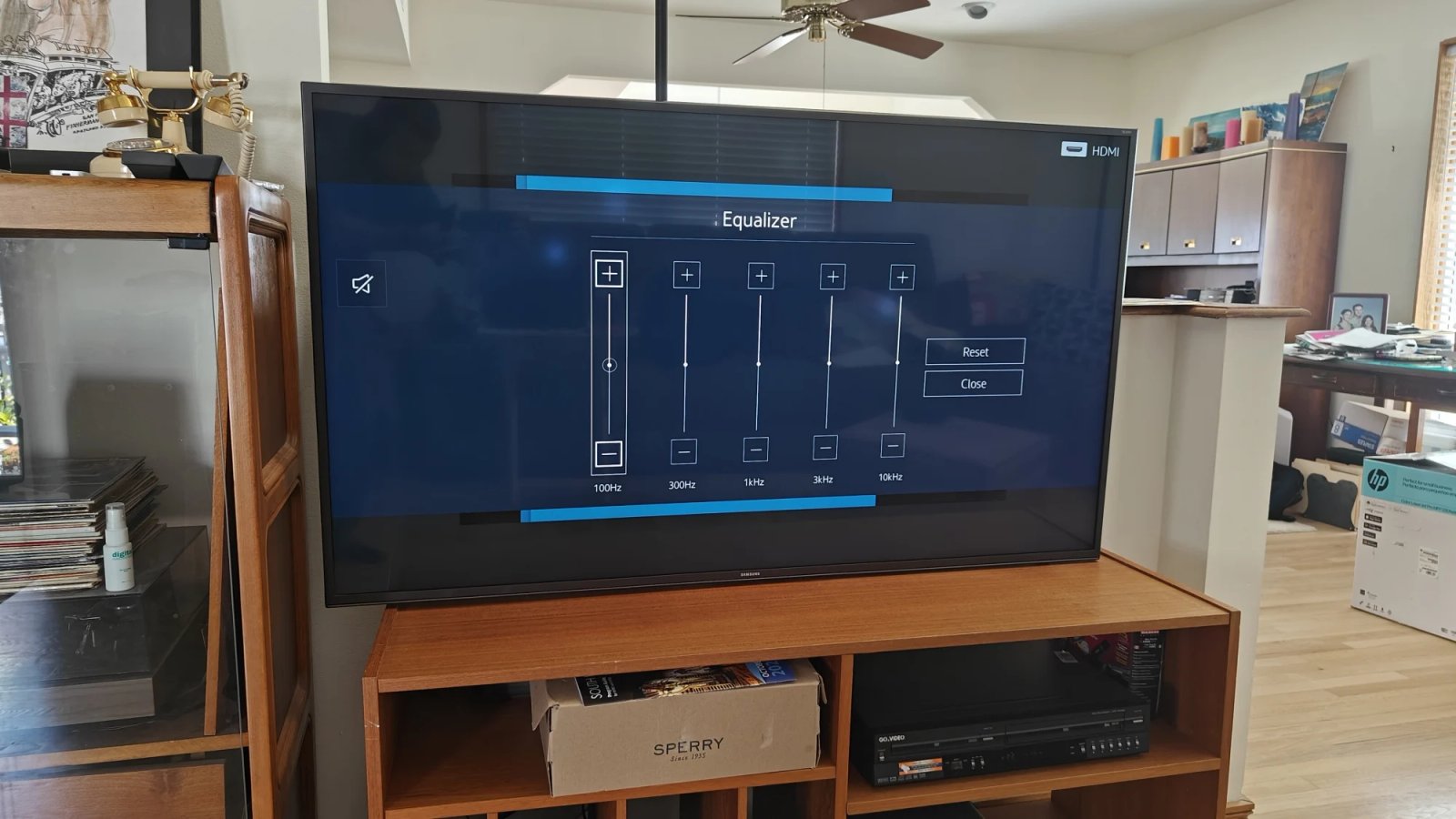
Your Samsung TV comes with a variety of built-in sound modes and equalizer options. Many people just plug it in and go, never venturing beyond the basic volume control. This is a huge missed opportunity! Navigate to your TV’s ‘Settings’ menu, then look for ‘Sound’ or ‘Audio’. Here, you’ll often find options like ‘Sound Mode’. Common modes include ‘Standard’, ‘Optimized’, ‘Movie’, ‘Music’, and ‘Clear Voice’. Experiment with these. ‘Movie’ mode usually enhances bass and surround effects, while ‘Clear Voice’ prioritizes dialogue, which is fantastic for news or dramas. Some Samsung models also feature ‘Adaptive Sound’ or ‘Adaptive Sound+’. This intelligent feature analyzes the content being played and the acoustics of your room, then automatically optimizes the sound. It’s like having a mini-audio engineer adjusting things on the fly! (Pretty neat, right?) For those who want more control, look for an ‘Equalizer’. This allows you to manually adjust bass, treble, and mid-range frequencies. A slight boost in the low-end (bass) can add depth, while tweaking the high-end (treble) can bring out clarity in dialogue and effects. “I always thought these settings were just for audiophiles,” my neighbor, John, admitted recently, “but after trying ‘Adaptive Sound’, I can’t go back. It’s truly a game-changer for casual viewing.”
2. Embrace External Audio: Soundbars and Home Theater Systems
Let’s be brutally honest: while modern TVs have incredible picture quality, their built-in speakers are often an afterthought. They’re thin, facing the wrong direction (downwards or backwards!), and simply can’t produce the rich, full sound that a dedicated audio system can. This is where external audio solutions come into play. A good quality soundbar for Samsung TV is arguably the most impactful upgrade you can make. It’s a single unit that sits beneath your TV, delivering significantly better stereo sound, often with simulated surround sound. Many Samsung soundbars also integrate seamlessly with Samsung TVs using features like Q-Symphony, where the TV’s speakers work in conjunction with the soundbar for an even more expansive soundstage. “It was like going from a small radio to a concert hall,” remarked Sarah, a self-proclaimed audiophile friend, after she finally invested in a decent soundbar. If you’re serious about your audio, a full home theater system with an AV receiver and separate speakers (front, center, surrounds, subwoofer) will provide the ultimate immersive experience, creating true cinematic sound right in your living room. The difference is astounding, truly. You get that deep rumble you feel in your chest, the clear dialogue that cuts through the chaos, and effects that seem to come from every corner of the room. It’s a sensory feast!
3. Connectivity Matters: Choose the Right Cables and Ports

You wouldn’t believe how many times I’ve seen a tangled mess of cables behind a TV, with audio routed through an ancient composite cable! To get the best sound quality from your Samsung TV to an external audio system, the connection method is critical. The gold standard for modern setups is HDMI ARC (Audio Return Channel) or, even better, HDMI eARC (Enhanced Audio Return Channel). Look for an HDMI port on your Samsung TV labeled ‘ARC’ or ‘eARC’. These allow your TV to send audio to a compatible soundbar or AV receiver using a single HDMI cable, simplifying your setup and ensuring high-quality, uncompressed audio. eARC, in particular, supports higher bandwidth and advanced audio formats like Dolby Atmos and DTS:X, delivering a truly three-dimensional soundscape. (It’s like sound is coming from above you, too – mind-blowing!) If your external device doesn’t support HDMI ARC/eARC, an optical digital audio cable (TOSLINK) is your next best bet. It provides a good digital audio signal, though it typically doesn’t support the very latest high-bitrate surround sound formats like uncompressed Dolby Atmos. Avoid using analog RCA cables (red and white connectors) for primary audio if you can help it, as they offer the lowest fidelity. Always ensure your cables are in good condition and securely connected. A loose cable can cause crackling, static, or even complete loss of sound, which is incredibly annoying when you’re in the middle of a suspenseful scene.
Advanced Adjustments for a Perfect Audio Experience

Once you’ve tackled the basic settings and connectivity, it’s time to consider the often-overlooked environmental factors and system maintenance that can significantly impact your audio. These aren’t always immediately obvious, but their effects are undeniable. My uncle, a true cinema buff, always says, “It’s not just the gear; it’s how you use it and where you put it!” He’s absolutely right.
4. Optimize Your Room’s Acoustics
This tip is often ignored, but it’s a huge factor in perceived sound quality. Your room itself is part of your audio system! Hard surfaces like bare walls, hardwood floors, and large glass windows can cause sound to reflect, creating echoes and muddling the audio. Conversely, soft furnishings absorb sound. “I never realized how much my minimalist decor was ruining my movie nights,” confessed my colleague, Emily, after she added a large rug and some thick curtains. If your room has a lot of hard surfaces, consider adding things like carpets or rugs, thick curtains, upholstered furniture, and even wall art or acoustic panels. These can help absorb sound reflections, leading to clearer, more controlled audio. Even the placement of your speakers (if you have an external system) makes a difference. Ensure your soundbar isn’t tucked away in a cabinet, for instance, which would muffle the sound. For surround sound setups, experiment with speaker angles and distances. Many modern soundbars and AV receivers come with room calibration features (like Samsung’s SpaceFit Sound or external microphone calibration) that can automatically adjust audio output based on your room’s unique acoustics. Don’t skip this step; it can work wonders!
5. Keep Your Samsung TV’s Firmware Up-to-Date

Think of your TV’s firmware as its operating system. Just like your phone or computer, it periodically receives updates. These updates aren’t just for new features or security patches; they often include performance enhancements, bug fixes, and sometimes even improvements to audio processing algorithms. A crucial step for maintaining optimal Samsung TV sound quality is to ensure your TV’s firmware is always current. You can usually check for updates through the ‘Settings’ menu, under ‘Support’ or ‘Software Update’. “It’s like giving your TV a brain upgrade!” I often tell my friends. Sometimes, a seemingly minor bug fix in an audio driver can resolve crackling, dropouts, or even improve the clarity of certain sound frequencies. It’s a simple, free step that can prevent a lot of headaches and keep your audio sounding its best. Don’t be one of those people who ignores the “Update Available” notification; embrace it!
6. The Source Quality: Garbage In, Garbage Out

This might seem obvious, but it’s often overlooked. If the audio signal coming into your TV is of poor quality, no amount of tweaking or external equipment will make it sound fantastic. It’s what my old tech professor used to call “garbage in, garbage out.” Whether you’re streaming content, watching a Blu-ray, or using a cable box, the quality of the source material matters immensely. For streaming services like Netflix, Disney+, or Amazon Prime Video, opt for subscriptions that offer high-quality audio formats like Dolby Atmos or Dolby Digital Plus. Ensure your internet connection is stable and fast enough to stream these high-bandwidth formats without compression. If you’re watching physical media, Blu-rays and 4K UHD discs generally offer superior uncompressed audio tracks compared to DVDs. Even your cable or satellite provider can impact quality; some channels transmit higher quality audio than others. Always choose the highest available audio track if your device allows. For example, if a streaming service offers both stereo and 5.1 surround sound, always select 5.1 if your system supports it. You’ll hear a world of difference!
7. Consider Professional Calibration or Advanced Settings
For the truly dedicated, or for those who still feel something is missing, professional audio calibration can be an eye-opener. An audio calibrator uses specialized equipment to measure your room’s acoustics and your system’s output, then fine-tunes everything for optimal performance. It’s a bit of an investment, but the results can be astonishing. “I once hired a pro for my home theater, and it was like getting a brand new system,” a friend shared, still amazed by the transformation. Many modern soundbars and AV receivers offer their own advanced calibration features, often involving a microphone that listens to test tones played through your speakers and then automatically adjusts levels, delays, and EQ. While not quite as precise as a professional, these auto-calibration tools are incredibly effective for getting a balanced sound. For those comfortable with more advanced manual adjustments within your Samsung TV’s ‘Expert Settings’ for audio, you can dive into features like ‘Balance’, ‘Digital Output Audio Format’ (ensure it’s set to ‘Pass-Through’ or ‘Auto’ for external systems), or ‘Dolby Digital Output’. A little research into what each setting does can empower you to truly master your audio environment. Don’t be afraid to experiment, just remember to note your original settings in case you need to revert!
Conclusion: The Symphony of Sight and Sound
The quest for optimal audio quality from your Samsung TV is a journey, not a destination. It’s an ongoing process of tweaking, experimenting, and refining to match your personal preferences and the unique characteristics of your viewing space. What sounds perfect in one room might be too boomy or too bright in another. But isn’t that part of the fun? The satisfaction of finally hitting that sweet spot, where dialogue is crystal clear, effects are punchy, and music swells with emotional resonance, is incredibly rewarding. I truly believe that investing a little time and effort into these seven tips will fundamentally change how you experience your favorite movies, shows, and games. You’ll go from simply watching to truly immersing yourself, feeling every nuanced sound as much as you see every pixel. So, the next time you settle down for an evening of entertainment, remember these pointers. Turn off the default settings, explore an external audio solution, check those cables, consider your room, keep your software updated, demand high-quality sources, and if you’re brave, dive into those expert settings. Your ears, and your overall viewing pleasure, will thank you for it. It’s time to let your Samsung TV sing!
Frequently Asked Questions
| What is the single most effective way to improve Samsung TV sound quality? | The most effective way to significantly improve your Samsung TV’s sound quality is to invest in an external audio system, such as a dedicated soundbar or a full home theater setup. While internal settings help, TV speakers have physical limitations that external systems overcome, providing richer bass, clearer dialogue, and a wider soundstage. |
| How does HDMI ARC/eARC improve audio quality? | HDMI ARC (Audio Return Channel) and especially eARC (Enhanced Audio Return Channel) allow your Samsung TV to send high-quality digital audio to a compatible soundbar or AV receiver using a single HDMI cable. eARC supports higher bandwidth, enabling uncompressed, advanced audio formats like Dolby Atmos and DTS:X, which deliver a more immersive, three-dimensional sound experience than older connection types. |
| Can room acoustics really affect my TV’s sound? | Absolutely. Your room’s acoustics play a crucial role. Hard surfaces like bare walls, large windows, and hardwood floors reflect sound, causing echoes and muddying the audio. Adding soft furnishings like carpets, thick curtains, and upholstered furniture can absorb sound, reducing reflections and leading to clearer, more controlled, and balanced audio. Even speaker placement impacts the sound. |
| Are the default sound settings on Samsung TVs good enough? | While default settings are adequate for casual viewing, they rarely provide the best possible sound quality. Samsung TVs offer various sound modes (like Movie, Music, Clear Voice) and equalizer options, along with intelligent features like Adaptive Sound. Exploring and customizing these settings can significantly enhance your audio experience beyond the factory defaults, tailoring it to your content and preferences. |
| Why is keeping my TV’s firmware updated important for sound quality? | Firmware updates for your Samsung TV often include performance enhancements, bug fixes, and sometimes even improvements to audio processing algorithms. Keeping your TV’s software current can resolve audio glitches, improve clarity, and ensure compatibility with the latest audio technologies and external devices, preventing potential sound issues and optimizing overall performance. |
Important Notice
This FAQ section addresses the most common inquiries regarding the topic.